
Smith County court docket records provide updated information about scheduled hearings, case listings, and trial dates within the county judicial system. These records include civil filings, criminal matters, and ongoing proceedings recorded by court offices. Users can find case numbers, party names, and hearing timelines recorded in official systems. Public record listings help track case movement through different stages of litigation. The docket system supports transparency in court operations and keeps case information organized for legal reference. Court entries update regularly based on filings and hearings.
Smith County court docket information includes daily court schedules, assigned judges, and updates on active cases across multiple court divisions. Records reflect filings from criminal courts, civil courts, and family court matters. Case details often show hearing dates, courtroom assignments, and case progress status. Legal professionals and the public review docket entries for case tracking and preparation of proceedings. Organized listings support clear case reference within county judicial records and maintain structured reporting of court activity. Updates reflect recent filings from court clerks.
How to Search Smith County Court Docket Online
Smith County court docket search allows users at Smith County Court to view active cases, hearing information, and court schedules through an official online system. The process works through the county’s public hearing portal, where case records are stored in a structured format. Users can check civil, criminal, and family court updates using simple search filters. This system is widely used for court docket lookup online, especially for tracking hearing dates, case progress, and courtroom assignments. It removes the need for in-person visits and gives direct digital access to court hearing data.
Open the Official Hearing Search Portal
The first step is to visit the official Smith County hearing search system: https://portal.smith-county.com/Public/Home/Dashboard/26
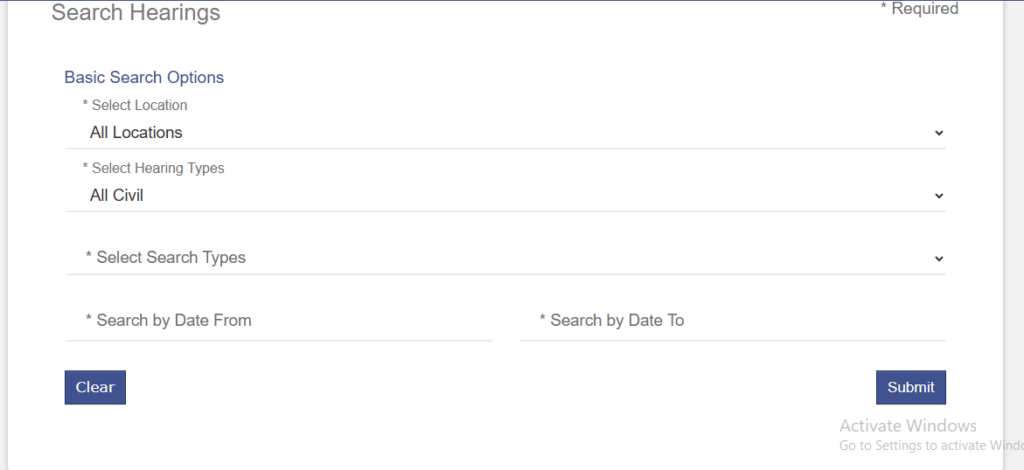
This page is the main entry point for court calendar search and docket records. It is part of the county’s public judicial information system. Once the page opens, users will see a Search Hearings interface with multiple filters. This tool pulls real-time data from court scheduling records.
Search Panel Options
The search tool includes different options to refine court docket lookup online results. Each field helps narrow down active cases and hearing information.
Available options include:
- Select Location → Choose courthouse or keep “All Locations”
- Select Hearing Types → Civil, Criminal, Family, Probate
- Select Search Types → Case-based or calendar-based search
- Search by Date From / To → Set hearing date range
These filters help users locate exact court entries without scanning large record lists.
Choose Search Method (Case or Calendar Search)
The system supports multiple ways to find court records.
Case-Based Search
This method is used when a case number is available.
- Enter full case number
- Select hearing type if known
- Click search
- System shows exact case record
This option provides the most accurate results for active cases tracking.
Calendar-Based Search
This method is used for general hearing information.
- Select date range
- Choose hearing type
- Leave case number blank
- Submit search
This option is useful for viewing all hearings scheduled on specific dates.
Enter Search Details and Submit
After selecting filters, users can enter details into the form:
- Case number (if available)
- Party name (plaintiff or defendant)
- Date range for hearings
- Court division or type
Once completed, click the Submit button to generate results.
The system will load matching entries from the online court database.
Review Search Results
After submission, results will appear in a structured list format. Each entry represents a court hearing record.
Users can view:
- Case title and number
- Hearing date and time
- Courtroom location
- Case type (civil, criminal, family)
- Current status of case
This helps identify active cases and upcoming hearings quickly.
Open Full Docket Details
Clicking any result opens detailed case information. This section provides full docket records.
Inside the record, users can find:
- Filing date of the case
- Assigned judge or court division
- Full party names
- Hearing schedule history
- Case progress updates
- Future court dates
This section is the most important part of court docket lookup online, as it shows complete case movement.
Track Hearing Information and Updates
Users can return to the system regularly to track updates. Court schedules may change based on filings or judge availability.
Common updates include:
- Rescheduled hearings
- New court dates added
- Case status changes (active, pending, closed)
- Additional filings or motions
Types of Court Docket Records in Smith County
Smith County docket records organize all court cases by type, status, and scheduled hearings. These docket records include criminal docket, civil docket, family law cases, probate cases, and other filings within the county court system. Each record type shows how a case moves through the court process, from filing to final decision. Users often review docket records to track hearing dates, case updates, and legal actions linked to ongoing proceedings.
Criminal Court Docket
Criminal court docket records list cases where a person is charged with breaking the law. These records include both felony docket and misdemeanor cases, depending on how serious the offense is. Felony docket entries usually involve serious crimes such as assault or drug-related charges. Misdemeanor cases cover minor offenses like traffic violations or petty theft. Each entry shows case progress, hearings, and court decisions in chronological order.
- Case number and filing date
- Defendant details and charge type
- Arrest and bond information
- Hearing schedule and court actions
Civil Court Docket
Civil court docket records involve disputes between individuals, businesses, or organizations under civil litigation records. These cases do not involve criminal charges but focus on financial or legal disagreements. Common civil docket matters include contract disputes, property damage claims, landlord-tenant issues, and debt recovery cases. Each record shows filings, motions, and court hearings. Civil dockets help track how disputes progress, including settlements, judgments, or trial outcomes.
- Parties involved in the case
- Filing date and case type
- Motions and court rulings
- Hearing and trial dates
Family Court Docket
Family court docket records cover family law cases involving domestic relationships and related legal matters. These include divorce cases, child custody disputes, child support enforcement, and spousal support hearings. Family docket entries often show repeated hearings as courts review agreements or modifications. Some cases involve mediation sessions before final rulings. These records reflect ongoing legal decisions that affect family structure, responsibilities, and financial arrangements between parties.
- Divorce and custody filings
- Support orders and modifications
- Hearing dates and court reviews
- Mediation or settlement updates
Probate & Other Records
Probate court docket records deal with estate administration after a person’s death. These cases include wills, inheritance distribution, and appointment of executors or administrators. Probate dockets also show creditor claims, asset division, and court supervision of estate matters. Other records may include guardianship cases and name change petitions, which fall outside criminal, civil, or family categories but still appear in county docket systems for official tracking.
Smith County Court Calendar & Hearing Schedule
Smith County court calendar lists all scheduled court activity, including hearings, trials, and judge assignments for active cases. This hearing schedule helps users track upcoming hearings, trial dates, and courtroom activity across criminal, civil, and family cases in magistrate court settings. It also reflects scheduled court appearances and judicial calendar updates. Each entry shows when and where a case will be heard, making it easier to follow case progress and confirm court hearing timetable details.
How Users Check Court Hearing Timetable
Users check the court hearing timetable through official online court systems or county portals that publish scheduled court appearances. These platforms usually allow searches by case number, party name, or hearing date. Once entered, the system displays court calendar entries linked to the case, including upcoming hearings and assigned courtroom details. Many users rely on these tools to stay updated on trial listings and avoid missing important court dates or procedural hearings.
What Court Calendar Entries Include
Each court calendar entry provides structured details about scheduled hearings and judicial calendar updates. These entries typically include the case number, party names, hearing type, date, time, and assigned judge. Some listings also show courtroom location and case status updates, such as continuances or rescheduled trial dates. This information helps users clearly understand what stage the case is in and what type of court hearing timetable event is scheduled next.
How to Check Active Cases in Smith County Courts
Smith County active cases include criminal, civil, and family matters that are still open and moving through the court system. These active cases appear in official docket records and court case lookup systems that show ongoing litigation status. Users often check pending cases to track hearings, review filings, and confirm case status updates. Each record reflects real-time court activity, including scheduled hearings, motions, and judicial actions across different case types.
Steps to Use Court Case Lookup System
Users can check active cases through official online court case lookup portals that publish docket records. These systems allow searches by case number, party name, or filing date range. Once a search is submitted, results display all matching active or pending cases with updated information. This method helps users track ongoing litigation without visiting the courthouse and provides quick updates on case progress.
- Open Smith County court case lookup portal
- Enter case number or party name
- Select active or pending case filter
- Review docket records and case updates
What Information Active Cases Display
Active case records provide structured details that help users understand the current stage of a case. These records show both procedural and scheduled updates, making it easier to follow litigation progress. Each entry reflects court activity such as filings, hearings, and motions submitted by parties or attorneys.
- Case type (criminal, civil, family)
- Current status (active, pending, scheduled)
- Party names and case number
- Recent docket filings and motions
- Upcoming hearing or trial dates
Criminal Active Cases
Criminal active cases include ongoing felony and misdemeanor matters still moving through hearings or trial preparation. These records often show bond hearings, arraignments, and pre-trial conferences. Updates may reflect plea discussions or evidence submissions. Users tracking criminal docket records can see how a case progresses step by step until final judgment or dismissal.
Civil and Family Active Cases
Civil active cases involve disputes like contracts, property issues, or financial claims under ongoing litigation. Family active cases include custody, divorce, and support matters with multiple scheduled hearings. These records often update after mediation sessions or court reviews. Court case lookup tools help users follow these developments through consistent docket record updates.
Criminal Docket Search in Smith County
Smith County criminal docket search provides a way to review court case lookup details for ongoing and past criminal matters. These criminal docket records include felony cases, misdemeanor charges, and other criminal proceedings handled by county courts. Users often rely on these records to check hearing information, track arrest records linked to cases, and follow updates in active or closed criminal matters. Each entry shows how a case moves through the court system from arrest to final judgment.
How Criminal Docket Search Works
Criminal docket search tools in Smith County allow users to find case details through official court case lookup systems. These systems organize criminal proceedings by case number, defendant name, or filing date. Once a search is completed, the system displays available hearing information, charge details, and current case status. This process helps users quickly review felony cases and misdemeanor charges without visiting the courthouse.
- Open Smith County court case lookup portal
- Enter defendant name or case number
- Filter results by criminal docket records
- View hearing information and case updates
What Criminal Docket Records Include
Criminal docket records provide structured information about criminal proceedings from start to finish. These records show how cases progress through hearings, motions, and court decisions. Users can also see links between arrest records and filed charges, helping them understand how a case develops in court.
- Case number and filing date
- Defendant identity and charge type
- Arrest records and booking details
- Hearing dates and courtroom assignments
- Case status (pending, active, or closed)
Felony Cases in Criminal Docket
Felony cases in the criminal docket involve serious offenses such as violent crimes, drug trafficking, or major theft charges. These cases often include multiple hearings, including arraignment, bail review, and pre-trial conferences. Court case lookup systems show detailed hearing information for each stage of the felony process, helping users track long-term criminal proceedings.
Misdemeanor Charges and Court Updates
Misdemeanor charges appear in criminal docket records for lower-level offenses such as minor theft, traffic violations, or disorderly conduct. These cases usually move faster through the court system with fewer hearings. Users checking criminal proceedings can see scheduled court dates, plea updates, and final outcomes through updated docket records and hearing information entries.
Legal Proceedings in Court Docket System
Legal proceedings in Smith County court docket system show how a case moves step by step through the judicial calendar and court schedule. Every case follows a structured case lifecycle that starts with filing, continues through multiple hearing stages, and ends with a final judgment. These docket records help track the trial process, monitor hearing updates, and understand how ongoing legal matters progress inside the court system.
Case Filing and Docket Entry Stage
Legal proceedings begin when a case is filed with the court and entered into the docket system. At this stage, the court assigns a case number and places it into the judicial calendar based on case type. Criminal cases may involve charges, while civil cases include disputes between parties. Family cases may focus on custody or support matters. This stage creates the official record used for all future court schedule updates and hearing tracking.
- Case registration and docket entry
- Assignment of case number
- Classification as criminal, civil, or family matter
- Initial filing documents recorded in system
Hearing Stages and Judicial Calendar Updates
After filing, the case moves into hearing stages listed in the judicial calendar. These hearings form the main structure of the court schedule and show how the case develops over time. Early hearings often focus on procedural matters, while later hearings involve evidence review or settlement discussions. Docket records update each change, including delays, rescheduling, or new trial dates.
- Initial appearance or arraignment
- Motion hearings and evidence review
- Pre-trial conferences and negotiations
- Updated hearing information in court schedule
Trial Process in Court Schedule
The trial process represents the most active phase of legal proceedings. During this stage, both sides present evidence, witnesses, and arguments. Criminal cases may involve jury trials, while civil cases focus on financial or contractual disputes. Family cases may involve custody evaluations or support decisions. The court schedule reflects exact trial dates, courtroom assignments, and judge details, helping users follow ongoing litigation through docket records.
- Presentation of evidence and testimony
- Jury or judge-led trial proceedings
- Cross-examination and legal arguments
- Official trial date listed in court schedule
Judgment and Case Lifecycle Completion
The final stage of legal proceedings is judgment, where the court issues a decision based on the trial process. This may include conviction, dismissal, settlement approval, or final orders. Once completed, the case status updates in the judicial calendar as closed or resolved. Docket records then reflect the full case lifecycle, from filing to final outcome, giving a complete view of how the legal process concluded.
Smith County Court Docket Locations
These official Smith County court offices provide access to docket records, case filings, hearing schedules, and court proceedings. Each office manages different parts of the court docket system including criminal, civil, probate, and municipal-level cases.
Main Smith County Courthouse
The Main Smith County Courthouse is the central location for district court hearings, trials, and scheduled case proceedings. Most active docket cases including civil and criminal matters are processed here. It serves as the primary judicial center for court appearances and public hearings.
Smith County Courthouse Information
- Address: 100 N Broadway Ave, Tyler, TX 75702
- Phone: (903) 590-4600
- Office Hours: Monday–Friday, 8:00 AM – 5:00 PM
- Official Website: Smith County Official Website
Smith County District Clerk Office
The District Clerk Office manages official criminal and civil court docket records in Smith County. It handles case filings, court documents, and record storage. Users access this office for certified copies and accurate district-level case information.
District Clerk Office Information
- Address: 100 N Broadway Ave, Room 204, Tyler, TX 75702
- Phone: (903) 590-1660
- Office Hours: Monday–Friday, 8:00 AM – 5:00 PM
- Official Website: Smith County District Clerk
Smith County County Clerk Office
The County Clerk Office handles probate cases, civil filings, and selected misdemeanor records. It provides certified copies, public record access, and official document services for county-level court matters and legal verification needs.
County Clerk Office Information
- Address: 200 E Ferguson St, Suite 300, Tyler, TX 75702
- Phone: (903) 590-4670
- Office Hours: Monday–Friday, 8:00 AM – 5:00 PM
- Official Website: Smith County Clerk Office
Tyler Municipal Court
The Tyler Municipal Court handles traffic tickets, city ordinance violations, and minor local disputes. It operates separately from district court docket records and focuses on municipal-level cases and citation processing.
Municipal Court Information
- Address: 813 N Broadway Ave, Tyler, TX 75702
- Phone: (903) 531-1266
- Office Hours: Monday–Friday, 8:00 AM – 5:00 PM
- Official Website: Tyler Municipal Court
Frequently Asked Questions
The Smith County court docket and court calendar system helps users track cases, hearings, and trial dates in an organized way. Below are common questions that explain how to search records, view updates, and understand what information is available in the court system.
How do I search Smith County court docket online
Smith County court docket can be searched through official court case lookup systems provided by the county. Users can enter a case number, party name, or filing date to find records. Once the search is completed, the system displays case details such as hearing dates, case status, and filings. This method allows quick review of both active and closed cases without visiting the courthouse in person.
Are criminal dockets public record
Yes, most criminal dockets are public record in Smith County unless restricted by law or sealed by the court. Public access typically includes felony cases, misdemeanor charges, and basic hearing information. Sensitive cases involving juveniles or sealed proceedings may not appear in the system. Users can still view general case updates, arrest-related filings, and court hearing schedules for eligible criminal cases.
How often is the court calendar updated?
The Smith County court calendar is updated regularly, often daily or weekly depending on court activity. Updates include new hearing dates, postponed trials, and judge assignments. This keeps the court schedule accurate for upcoming hearings and scheduled court appearances. Users checking the judicial calendar can see real-time changes to trial listings and courtroom schedules as cases move forward.
Can I search Smith County court docket by party name?
Yes, most court case lookup systems allow searches by party name. Users can enter a plaintiff, defendant, or involved party name to locate related docket records. This feature is useful when the case number is unknown. The results display matching cases, including hearing information, case status updates, and entries listed in the court calendar system.
What is included in docket records?
Smith county court docket records include detailed case information such as filing dates, case numbers, party names, and hearing schedules. They also show motions, court rulings, and status updates. Criminal, civil, and family cases all appear in the system with different levels of detail. These records help users track ongoing litigation and review court activity in one organized system.